(Step by Step Guide)
Introduction
If you run a business in Kitchener, being “on Google” is not enough. You want to appear when people search things like “plumber Kitchener”, “dentist near me”, or “best pizza in Kitchener”. That is where local SEO comes in.
General SEO helps you show up for broad searches across Canada or even globally. Local SEO focuses on ranking for searches in your own area so people in Kitchener, Waterloo, and Cambridge can actually find and contact you. According to Google and multiple industry studies, around 46% of all Google searches have local intent, which means people are actively looking for nearby products and services.
When your website is properly optimised for local searches, you can show up more often for “your service + Kitchener”, get more phone calls, more direction requests, and more enquiries from nearby customers. Every method in this guide uses free tools and free techniques. You do not need to buy software or run ads to follow this roadmap.
This step by step guide will show you how to audit where you are today, choose the right local keywords, fix your website, build citations, earn local links, and track your progress over time.
Section 1: Understanding Local Search in Kitchener
How Local Search Works
When someone types “dentist Kitchener” into Google, several things usually appear:
- Ads at the top (if anyone is running Google Ads)
- A map with three highlighted dental clinics (the local map pack)
- Regular website listings under the map

For the map pack and local results, Google uses a separate local algorithm. Google has stated that three main factors decide which businesses show up:
- Relevance – how well your business matches what the searcher is looking for
- Distance (proximity) – how close your business is to the person searching
- Prominence – how well known and trusted your business appears online, including reviews and links
If someone searches “how to brush teeth properly”, that is a general informational search. If they search “dentist Kitchener”, that is a local search with clear intent to find a nearby clinic. Your job is to send the right signals from your website and Google Business Profile so Google sees you as relevant, local, and trusted.
Why Local Optimisation Is Critical For Kitchener Businesses
A Google official has shared that roughly 46% of all Google searches have local intent. On top of that, multiple studies show:
- A large share of people search for local businesses weekly or even daily
- “Near me” and city based searches have grown massively in the last few years
- A very high percentage of people who do a local search visit or contact a business soon after
In Waterloo Region, where many people rely on smartphones to navigate, compare options, and check reviews, these habits are even stronger. If your website is not optimised for local searches, a competitor across town can easily appear above you and take the call.
Local SEO gives Kitchener businesses a way to compete fairly. Even a small business can outrank larger brands locally if their website and online presence are better optimised for Kitchener searches.
Section 2: Audit Your Current Local SEO Performance
Before you start changing things, you need a snapshot of where you stand today.
Free Tools To Check Your Rankings
Use these free tools:
- Google Search in incognito mode
- Open a private/incognito window
- Search “your main service + Kitchener”
- Example: “roofing contractor Kitchener”, “massage therapist Kitchener”
- Note where your website appears, if at all
- Google Business Profile Insights
- Open your Google Business Profile
- Check “Performance” or “Insights” to see:
- How people found you
- What search terms they used
- How many calls, website visits, and direction requests you received
- Google Search Console (free)
- If you have not set it up, do it now in a few minutes
- You will see which queries you already rank for, even if you are not on page one
- BrightLocal’s free local search checker
- Search “BrightLocal local SERP checker”
- Use their free tool to see how you rank from different postcodes in Kitchener
What To Look For
- Do you appear on page one for “your service + Kitchener”?
- Are you in the map pack at all?
- Which competitors consistently show up above you?
- What are they doing that you are not doing?
- Stronger Google reviews?
- Better location pages on their website?
- More detailed service pages?
Also look at your own website:
- Is your address clearly visible?
- Do you mention Kitchener and nearby areas in your content?
- Is your phone number easy to find on mobile?

Create Your Baseline Document
Open a Google Sheet or Excel file and record:
- 5–10 priority keywords such as “[service] Kitchener”, “[service] Waterloo Region”
- Your current ranking position or “not in top 50”
- The top 3 competitors for each keyword
- Current monthly traffic from Google Analytics
- Current monthly calls and website visits from your Google Business Profile
This will help you see progress over the next 3–6 months.
Section 3: Keyword Research For Kitchener Local Searches
Understanding Local Keywords
Local keywords are simply your service plus your city, region, or neighbourhood.
- Primary keywords: “plumber Kitchener”, “dentist Kitchener”
- Secondary keywords: “emergency plumber Waterloo Region”, “family dentist near Waterloo”
- Long tail keywords: “24 hour plumber near Doon Kitchener”, “best dentist for kids in Huron Park Kitchener”
- Neighbourhood keywords: “roofing contractor Forest Heights Kitchener”, “electrician in Stanley Park Kitchener”
You want a mix of all three so you can rank for both broad and specific searches.
Free Keyword Research Methods
Method 1: Google Autocomplete
- Type your service into Google followed by “Kitchener”.
- Note the autocomplete suggestions.
- Scroll down and look at the “People also ask” questions.
- At the bottom, note the “Related searches” section.
Build a list of 20–30 keyword phrases from these ideas.
Method 2: Google Business Profile Insights
In your profile:
- Look at the search terms people used to find you
- Add these exact phrases to your keyword list
- These are real words your Kitchener customers use
Method 3: Competitor Research
- Search your main keyword such as “HVAC contractor Kitchener”.
- Open the top 3 organic results.
- Look at their title tags, meta descriptions, and headings.
- Note phrases they repeat, such as “furnace repair Kitchener”, “AC installation Waterloo Region”.
Add useful phrases to your list.
Method 4: Google Keyword Planner (Free)
- Create a free Google Ads account (you do not need to run ads).
- Open “Keyword Planner”.
- Choose “Discover new keywords”.
- Enter seed keywords like “plumber Kitchener”, “drain cleaning Kitchener”.
- Set location targeting to Kitchener or Waterloo Region.
- Export the keyword list with search volumes.

Method 5: AnswerThePublic (Free)
- Go to AnswerThePublic.
- Enter “[your service] Kitchener”.
- Note the questions people ask, such as “how much does plumbing cost in Kitchener”.
- Use these as blog topic ideas and FAQ sections.
Organise Your Keywords By Intent
Group your keywords:
- Informational: “how to choose plumber Kitchener”, “furnace maintenance tips Kitchener”
- Transactional: “plumber Kitchener prices”, “book dentist Kitchener”
- Local: “[service] near me”, “[service] Kitchener”
- Emergency: “emergency plumber Kitchener”, “24 hour electrician Kitchener.”
Informational keywords are perfect for blogs and guides. Transactional and local keywords belong in your homepage, service pages, and contact page.
Section 4: On Page Optimisation For Local Search
Step 1: Optimize Your Homepage
Title Tag (Most Important)
Use this formula:
Primary Service | Business Name | Kitchener, Ontario
Example:
Emergency Plumbing Services | Smith Plumbing | Kitchener, ON
Tips:
- Keep it under 60 characters where possible
- Include your main keyword, such as “plumbing Kitchener”
- Make it readable for humans, not just search engines
How to edit:
- WordPress: Use a free plugin like Yoast SEO or Rank Math. Under each page, you can edit the SEO title.
- Wix: Go to the page, click “SEO Basics”, then edit the title tag.
- Squarespace: Open the page settings and edit the SEO title.
Meta Description
Use this formula:
Short pitch + location + call to action
Example:
“Licensed plumber serving Kitchener, Waterloo, and Cambridge. Emergency repairs, installations, and maintenance. Call today at [phone number].”
Tips:
- Aim for 150–160 characters
- Include your main service and location
- Add your phone number when possible
Edit your meta description in the same place as the title tag.
H1 Heading (Main Heading)
Your homepage should have one H1 heading that includes your main service and location.
Example:
“Professional Plumbing Services in Kitchener, Ontario”
Use only one H1 per page. Other section headings should be H2 or H3.
Body Content Optimisation
On your homepage:
- Include at least 500–800 words of helpful, unique content
- Mention Kitchener naturally 3–5 times
- Refer to nearby areas such as Waterloo, Cambridge, Breslau, and other parts of Waterloo Region
- Include Kitchener neighbourhood names such as:
- Downtown Kitchener
- Doon
- Forest Heights
- Huron Park
- Stanley Park
- Highland West
- Victoria Hills
- Answer common customer questions like “Do you offer 24 hour service?” or “Do you serve [area]?”
- Show your phone number and contact button clearly at the top and bottom of the page
Images With Alt Text
Every important image should have descriptive alt text. This helps with accessibility and SEO.
Examples:
- “Licensed plumber fixing leaking pipe in Kitchener home”
- “Dental clinic reception in Downtown Kitchener”
In most platforms, you can add alt text when you upload the image or by editing image settings.
Step 2: Create Location-Specific Service Pages
Why You Need Them
If you only have a generic “Services” page, you may struggle to rank for specific searches like “water heater repair Kitchener” or “emergency drain cleaning Kitchener”.
Separate service pages let you:
- Target “service + Kitchener” very clearly
- Answer deeper questions about each service
- Show up for more long tail searches
Example Service Pages
- Emergency Plumbing Kitchener
- Water Heater Repair Kitchener
- Drain Cleaning Waterloo Region
- Furnace Repair Kitchener
- Teeth Whitening Kitchener
Service Page Template
Use this simple structure:
- H1: “Emergency Plumbing in Kitchener, Ontario”
- Introduction (100–150 words):
- Explain what you offer in Kitchener
- Mention that you serve nearby areas such as Waterloo and Cambridge
- What Is Included:
- Bullet point list of tasks or problems you fix
- Why Choose Us:
- Experience, response time, local knowledge, and guarantees
- Neighbourhoods Served:
- Mention areas like Doon, Huron Park, Forest Heights, and Downtown Kitchener
- FAQ Section (3–5 questions):
- Example: “Do you charge extra for emergency calls in Kitchener?”
- Call To Action:
- Phone number, contact form, booking link
Aim for at least 500 words per page.
Step 3: Optimize Your Contact Page
Your contact page is a strong local signal. It should include:
- Full business name
- Street address in Kitchener
- Local phone number
- Email address
- Business hours
- Short description of your service area
Add An Embedded Google Map
- Go to Google Maps and search your business.
- Click “Share”, then “Embed a map”.
- Copy the HTML iframe code.
- Paste it into your contact page in the appropriate HTML block or code block.
This shows Google and users exactly where you are located.
Schema Markup For Contact Page
A schema is a small piece of code that helps Google understand your business details more clearly.
- Search for “Google Structured Data Markup Helper”
- Choose “Local Businesses”
- Enter your contact page URL
- Highlight your business name, address, phone, and hours
- Let the tool generate the HTML
- Paste the generated code into your contact page’s HTML (often in the header or footer)
Then test your page using Google’s Rich Results Test. Fix any errors it shows.
Step 4: Create An “Areas We Serve” Page
Why This Page Matters
Many people search by neighbourhood or “near me”. An “Areas We Serve” page helps capture those searches and shows that you truly understand Kitchener.
Suggested Structure
- H1: “Serving Kitchener and Waterloo Region”
- Short introduction about working across Kitchener, Waterloo, and nearby communities
- List neighbourhoods and areas as H2 headings, for example:
- Downtown Kitchener
- Doon
- Forest Heights
- Huron Park
- Stanley Park
- Highland West
- Victoria Hills
- Bridgeport
- Country Hills
- Laurentian Hills
- Pioneer Park / Doon South
- Chicopee
- Idlewood
- Breslau (nearby)
Under each H2, write 50–100 words describing:
- The type of work you often do there
- Any local landmarks
- A clear line such as “If you live in [neighbourhood] and need [service], we can help.”
Link from this page to your main service pages and your contact page.

Section 5: Technical SEO For Local Businesses (Free Methods)
Step 1: Ensure Your Website Is Mobile Friendly
Use Google’s Mobile Friendly Test. If you see problems such as:
- Text too small
- Content wider than screen
- Clickable elements too close together
Then:
- Increase font sizes
- Use responsive themes or templates
- Make sure buttons are large enough for thumbs
Most modern WordPress, Wix, and Squarespace themes are mobile responsive if set up correctly.

Step 2: Improve Page Speed
Use Google PageSpeed Insights to test your homepage and key service pages.
Common free fixes:
- Compress images using a free tool such as TinyPNG
- Use a caching plugin on WordPress
- Reduce large sliders and heavy animations
- Remove unused plugins or scripts
Faster pages give a better user experience and can improve your local rankings.
Step 3: Set Up Google Search Console (Free)
- Visit Google Search Console and click “Start now”.
- Add your domain.
- Verify ownership using one of the suggested methods (DNS, HTML file, or tag).
- Once verified, you can:
- See which queries bring traffic
- Check for indexing errors
- Submit your sitemap
Step 4: Create And Submit An XML Sitemap
A sitemap helps Google discover your pages.
- WordPress: Install Yoast SEO or Rank Math; both generate a sitemap automatically.
- Wix and Squarespace: These platforms usually create sitemaps automatically at yourdomain.com/sitemap.xml.
- Other platforms: Use a free generator such as XML-sitemaps.com.
In Google Search Console, go to “Sitemaps” and submit your sitemap URL.
Step 5: Fix Broken Links
Broken links are annoying for users and can affect local SEO.
- Use Search Console’s “Coverage” and “Page indexing” reports to find 404 errors.
- Use a free broken link checker tool if needed.
- Update broken links to new pages or remove them.
Check your key pages at least once a month.
Step 6: Set Up SSL (HTTPS)
Visitors expect to see the padlock and “https”. Many hosts provide free SSL (for example, Let’s Encrypt).
- Turn on SSL in your hosting control panel.
- Update your site URL to use https.
- Redirect http to https using the host’s settings or a plugin.
Section 6: Content Strategy For Local SEO
Create Location Focused Blog Content
Blog posts are a powerful way to target more local keywords and answer real questions.
Blog Topic Ideas For Kitchener Businesses
- “Top 5 [Your Service] Problems In Kitchener Homes”
- “Complete Guide To [Your Service] In Waterloo Region”
- “How Much Does [Your Service] Cost In Kitchener?”
- “Emergency [Your Service]: What Kitchener Residents Should Know”
- “[Season] [Service] Tips For Kitchener Homeowners”
- “Our [Service] Process For Kitchener Businesses”
Blog Post Structure
Each blog should:
- Have a title with a local keyword, such as “How Much Does Furnace Repair Cost In Kitchener?”
- Use an introduction that mentions Kitchener and Waterloo Region
- Use H2 headings with variations like “[service] in Kitchener”, “cost of [service] in Waterloo Region”
- Be at least 1,000–1,500 words where possible
- Include local examples and scenarios
- Include images with local alt text
- End with a clear call to action
Content Calendar (Using Google Sheets)
Use a simple spreadsheet:
- Plan 1–2 blog posts per month
- Include a mix of service focused and educational topics
- Add seasonal posts for winter prep, spring maintenance, back to school, etc.
- Stick to your schedule so Google sees fresh content regularly.
Internal Linking Strategy
Inside your content:
- Link from blog posts to the most relevant service pages
- Link between related service pages
- Link to your contact page with descriptive anchor text
- Aim for 2–5 internal links per page
Example:
Instead of “click here”, use “see our Kitchener plumbing services” as the anchor text.

Section 7: Building Local Citations (Free Methods)
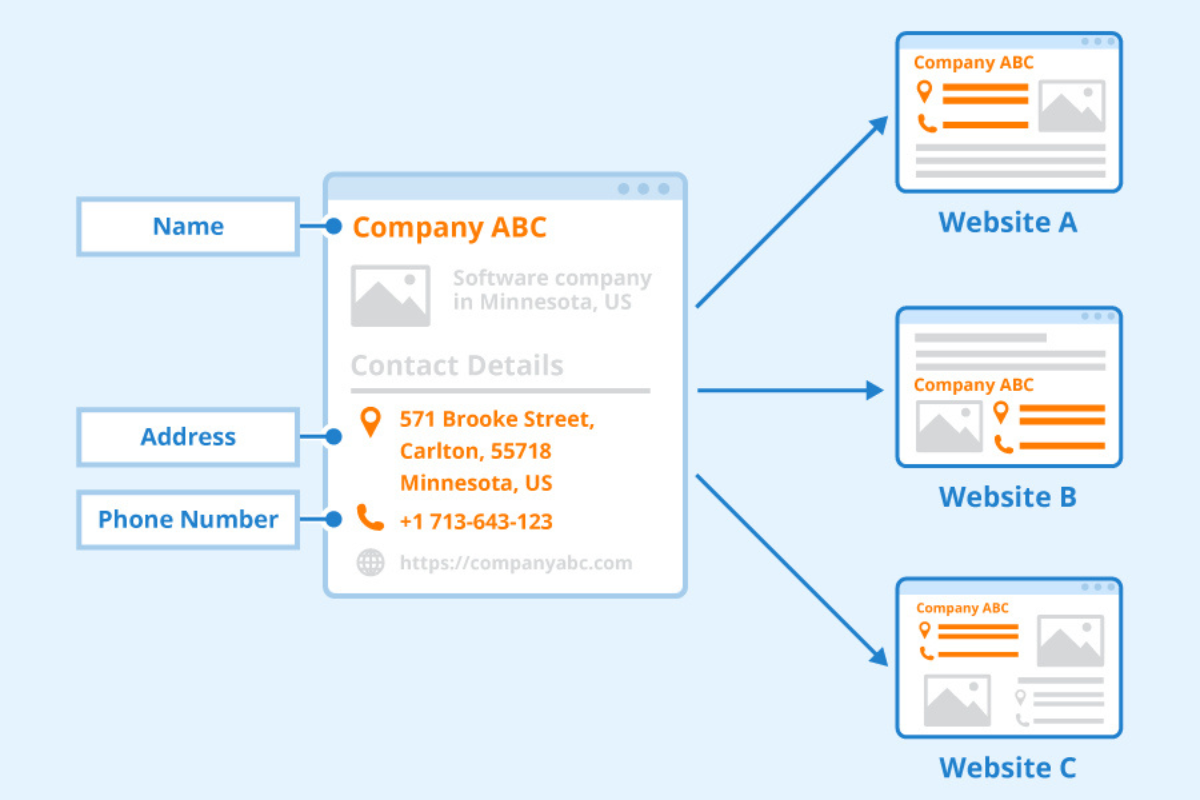
What Are Citations?
Citations are online mentions of your business name, address, and phone number (NAP). They help confirm to Google that your business is real and located where you say.
Consistency is critical. Your NAP should be identical everywhere.
Free Directory Listings For Kitchener Businesses
Start with:
- Google Business Profile
- Bing Places for Business
- Apple Maps
- Facebook Business Page
- Yelp Canada
- Yellow Pages Canada
- Better Business Bureau (if appropriate)
- Kitchener Waterloo Chamber of Commerce business directory
Then add industry specific sites:
- HomeStars or Houzz for contractors and home services
- RateMDs for healthcare
- Avvo or similar for lawyers
- Restaurant directories for food businesses
Look for local Kitchener business directories, community websites, and local news sites that offer business listings.
Step By Step Citation Building
- Create a spreadsheet with your exact business name, address, and phone number.
- For each directory:
- Create or claim your listing
- Fill in all possible fields
- Use the same NAP and description
- Add photos where allowed
- Mark each directory as “Complete”, “Pending”, or “In progress” in your sheet.
Citation Audit (Free)
Search your business name and phone number in Google.
- Check for incorrect or outdated information
- Claim and fix those listings
- Update them to match your current NAP
Section 8: Schema Markup For Local Businesses (Free)
What Is Schema Markup?
Schema markup is a small amount of code that tells search engines more about your business. It can help Google show richer results, such as business details and reviews, directly in search.
Types Of Schema For Kitchener Businesses
- LocalBusiness (most important)
- Organization
- Service
- Review or AggregateRating (if you display reviews on your site)
How To Add Schema
Method 1: Google’s Structured Data Markup Helper
- Search “Structured Data Markup Helper”.
- Choose “Local Businesses”.
- Enter your contact page URL.
- Highlight your name, address, phone, and other details.
- Let the tool generate HTML.
- Paste this code into your site, usually in the <head> section or through a code injection area.
Method 2: WordPress Schema Plugins (Free)
If you use WordPress, you can install a free plugin such as “Schema & Structured Data for WP”.
- Install and activate the plugin.
- Choose “Local Business” schema type.
- Fill in your business details for your Kitchener location.
Test Your Schema
Use Google’s Rich Results Test:
- Enter your URL
- Run the test
- Fix any errors or warnings the tool shows
- Retest until your schema is valid

Section 9: Local Link Building (Free Strategies)
Why Local Backlinks Matter
Backlinks from relevant, trustworthy local sites help Google see that your business is known in Kitchener. A single link from a strong local site can be more valuable than many weak links from unrelated sites.
Free Link Building Methods For Kitchener Businesses
- Local Sponsorships
- Sponsor a youth sports team, a local event, or a charity fundraiser.
- Many organisers list sponsors on their websites with links.
- Local Press And PR
- Send press releases to local media when you launch something new or support community projects.
- Offer to provide expert comments for stories related to your industry.
- Guest Blogging
- Offer useful articles to local blogs or business associations.
- Include a short bio with a link back to your site.
- Resource Pages
- Look for local schools, colleges, or municipal sites with “resources” or “local businesses” pages.
- Politely ask them to include your business as a recommended provider.
- Local Partnerships
- Team up with complementary businesses.
- For example, a plumber, electrician, and HVAC contractor could create a shared “trusted partners” page and link to each other.
- Community Involvement
- Join the Kitchener Waterloo Chamber of Commerce or other associations.
- Many offer a member directory with links.
- Create Shareable Local Content
- Write an “Ultimate Guide to [Topic] in Kitchener”.
- Include local data, maps, or checklists.
- Other sites may naturally link to it as a reference.

Section 10: Monitoring And Improving Your Local SEO
Free Tools For Tracking Progress
Google Search Console
Use it to:
- See which queries show your site
- Monitor click through rates
- Check for indexing or technical issues
Review at least once a month.
Google Analytics
Use it to:
- Track how many visitors come from organic search
- See which pages get the most local traffic
- Measure enquiries and conversions such as contact form submissions or phone clicks
Google Business Profile Insights
Use it to:
- Track how often you appear in local searches
- See how many people call, visit your site, or request directions
- Compare month over month performance
Manual Ranking Checks
Once a week or once every two weeks:
- Use incognito mode
- Search 5–10 main keywords
- Take screenshots or record positions in your spreadsheet
- Note any big changes or new competitors
What To Monitor Monthly
- Rankings for your top keywords
- Organic traffic from Google
- Calls and enquiries from your website and profile
- New reviews on Google
- Page speed and technical health
When To Adjust
- If you are not ranking at all after 3 months:
- Revisit your on page optimisation and content quality.
- If rankings drop suddenly:
- Check for technical issues or major site changes.
- If you get traffic but no leads:
- Improve your calls to action and contact options.
Section 11: Common Local SEO Mistakes To Avoid
- Inconsistent business name, address, and phone across directories
- Duplicate or thin content on service pages
- Ignoring mobile users and slow loading pages
- Skipping Google Business Profile or leaving it incomplete
- Not responding to customer reviews
- Weak or generic title tags and headings
- No local keywords in your website content
- Never updating your site or adding new content
- Giving up too quickly (local SEO usually takes 3–6 months to show strong results)

Section 12: Maintaining Your Local SEO (Monthly Checklist)
Week 1: Content
- Publish one new blog post or update an old one
- Add internal links from new content to service pages
- Share your post on social media or by email
Week 2: Technical
- Check Google Search Console for new errors
- Run your homepage through PageSpeed Insights
- Fix any new broken links
- Confirm that your site still looks good on mobile
Week 3: Citations And Links
- Add your business to one or two new, relevant directories
- Reach out to at least one local partner or website for a possible link
- Fix any citation inconsistencies you find
Week 4: Reviews And Engagement
- Respond to every Google review you received
- Ask at least five recent customers for a review
- Post an update or offer on your Google Business Profile
- Answer any new Google Q&A questions
Repeat this monthly routine and your local presence will steadily get stronger.
Local SEO is not about tricks. It is about clearly showing Google and your customers that you are a real, trustworthy business serving Kitchener and Waterloo Region.
In this guide, you have learned how local search works, how to research Kitchener specific keywords, how to optimise your website pages, improve your technical setup, build citations, earn local links, and monitor your progress with free tools. If you follow these steps consistently, you can expect to see meaningful improvements in 3–6 months, often sooner for less competitive services.
Every strategy in this guide is completely free. You are investing time and effort instead of ad spend, and the results can last for years once your foundations are strong.
Start with your homepage and main service pages, then work through the technical checklist, content strategy, and citation building. Use your baseline document to track progress so you can see how your work is paying off.
Ready to boost your Kitchener business with local SEO? Contact us today